Set up your business on Battut
Create the business profile that owns your team, ads and plan.
- Who can do this:
- Everyone on the team
- Plan:
- Every plan, including Free
- Last updated:
Battut Business works with your normal Battut account. The account that creates the business becomes its owner. Its posts, followers and messages are the ones you manage in the portal.
Before you start
- A Battut account in good standing. Sign in with the same Google, Apple or email account you use in the app.
- Business access. Battut Business is invite-only for launch, so a Battut admin must give your account access, or a business owner must add you to their team.
Steps
- Step 1:
Go to business.battut.app and sign in with your Battut account.
- Step 2:
If you see Create your business profile, fill in Legal name, Display name, Category and Business email. Website is optional.
- Step 3:
Select Create business.
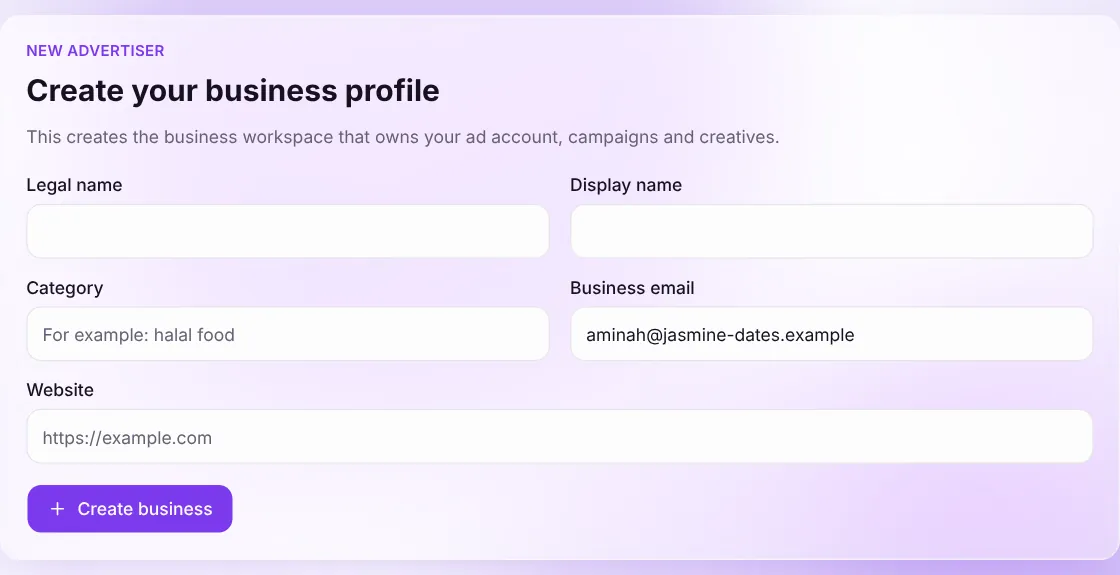
Screenshot:The form you see the first time you sign in.Sample business and numbers. Your screen shows your own. - Step 4:
Open Profile and add a photo and bio, so people know who you are when they find you.
What happens next
- Your business workspace is ready and the sidebar opens on Home.
- Next, verify your business and choose a plan.
Common questions
Can one account run more than one business?
Yes. When you belong to more than one business, a Business menu at the top of the sidebar lets you switch between them.
Does creating a business cost anything?
No. Every business starts on the Free plan. You only pay if you pick a paid plan.
Related articles
Was this article helpful?